
As the new academic session starts, between course orientations, internships, and classwork, assignments somehow take the biggest hit. After a round of ChatGPT drafts, writing on my own and having ChatGPT edit it again, I realized that all my papers were missing one major thing: me.
The papers all sounded the same—flat information dumps that streamlined my unique thought process into a format that already exists. And at the end of the day, using AI detection tools to make sure that the work I turned in was actually mine was another headache.
So I started looking for alternatives and came across Grammarly. I’d only ever used it for spell checks and editing, and honestly, I was skeptical. I didn’t want another AI assistant, and I just didn’t want using AI to mean losing my voice.
My professors were fine with AI as long as the work was still mine, but that raised a few questions: Did my writing still sound like me? Could I explain how I got to the final version? And would I feel confident standing behind it?
Grammarly’s Superhuman Go claimed to address exactly that. I wasn’t convinced, so I put it to the test across three assignments, a reading-heavy seminar, and a scholarship application. Superhuman Go was already sitting inside the Grammarly extension I’d had since my freshman year. Just a toggle, no new app to download, no second subscription to track.
Here’s what I found: 👇
What Changed When I Used Grammarly’s Superhuman Go
📖 Reading: Half of my stress isn’t the essay itself; it’s the 40 pages of dense reading I have to absorb before I can even start writing. Superhuman Go’s Explain feature lets me highlight a confusing paragraph in my seminar reading and get a plain explanation, instead of losing my train of thought to a separate tab.
🎯 Understanding the assignment: Go adjusts to what’s in front of me—essay, discussion post, problem set—instead of treating everything like an essay. I even had it break down a confusing rubric for me.
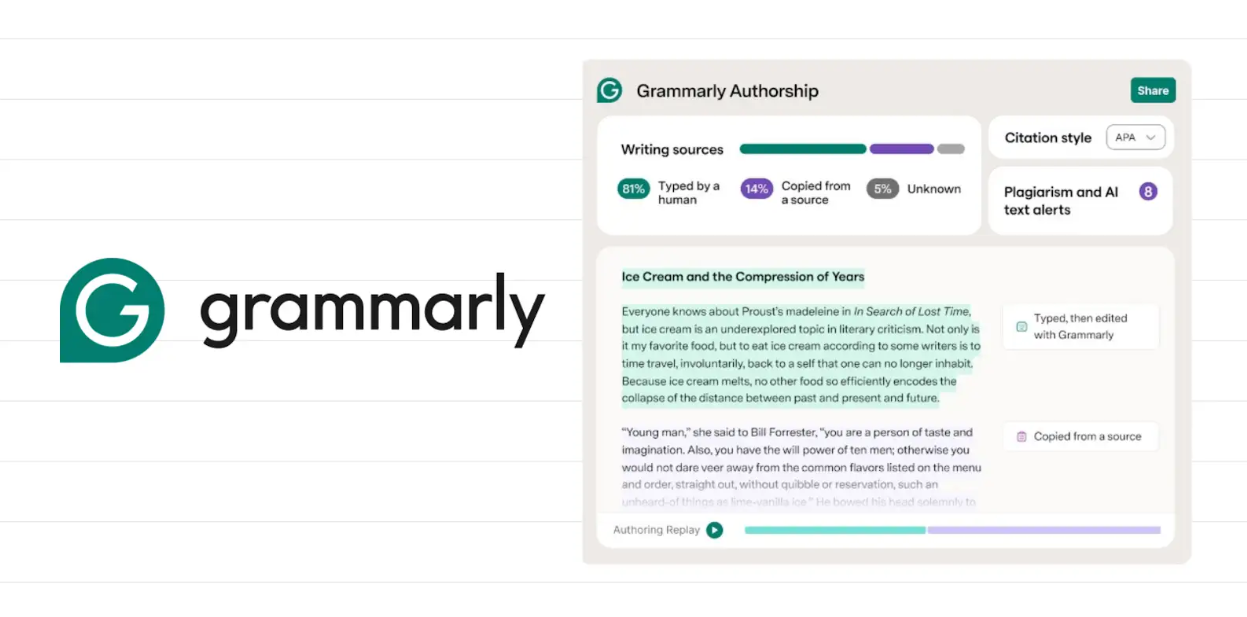
🔏 Being able to show my work: Go’s Authorship feature tracks what I typed, what I pasted, what came from AI, what I edited, and turns it into a report I can show a professor if asked.
🚩 Catching the stuff that gets students in trouble: The AI Detector flags sections that read as AI-generated, and the AI Rewriter helps me fix those specific spots so they sound like me, without doing a full rewrite. I ran my scholarship essay through it before submitting, and it caught two paragraphs where I’d leaned on AI too heavily.
🗣️ Sounding like myself: Humanizer nudges flagged writing back toward my actual voice and tone, instead of flattening it further into AI-neutral. This step used to take me the longest (write → get flagged → rewrite → check again); now it’s my fastest.
📚 Citations that don’t just check a box: Plagiarism Checker caught an overlap in a source I’d paraphrased too closely, before it became a much bigger problem with my professor. It also actually explained the citation formatting issue instead of just flagging it, and handled formatting as I wrote instead of scrambling at midnight to get it right.
Final Thoughts
I didn’t stop using AI. What changed was how I thought about using it. ChatGPT is still useful when I need to brainstorm or get an idea moving. But I don’t want every step after that to mean handing more of my writing over to AI.
Superhuman Go sits with me throughout the process and is free with a Grammarly account; no need to add a credit card, no new app, just a toggle. All the tools I used this semester—Explain, Authorship, AI Rewriter, Humanizer, and Citation Finder—came with that. It’s not doing the thinking for me. It’s making my thinking clearer while helping me keep track of what is actually mine.
Unlimited AI Detector checks and the full Plagiarism Checker are part of Grammarly Pro, and they are worth it for anything higher-stakes, like your research papers and scholarship essays.